VS Code Remote SSH Login By Key
Preface
The Remote SSH extension in VS Code provides the functionality to connect to other remote hosts. While the basic way of connection requires a username and password, using a key allows for direct login without the effort to type the password every time.
However, it's crucial to understand that VS Code merely provides a GUI, and how to use a SSH key to login is a separate matter. These two aspects should not be confused.
This article will primarily explain how to configure SSH keys on both the local machine and the remote machine. Subsequently, it will delve into the usage of the VS Code Remote SSH extension.
Environment
- Local Machine: Windows 10
- Remote Machine: Local virtual machine CentOS 8, root user
Local SSH Configuration
Using the ssh-keygen command will create the RSA public-private key pair for the local machine in the C:\users\<user>\.ssh directory:
1 | PS C:\Users\Gustav\.ssh> dir |
id_rsa is the private key, and id_rsa.pub is the public key.
Remote Host SSH Configuration
Upload the local id_rsa.pub to the ~/ssh directory on the Linux remote host and rename it to authorized_keys:
1 | [root@CentOS100 .ssh]# ll |
测试
The steps above complete the configuration needed for SSH key login. Open PowerShell on the local machine and test the connection using ssh <user>@<ip>. It should allow direct login without entering a password.
1 | PS C:\Users\Gustav> ssh root@CentOS100 |
VS Code Configuration
-
Install the Remote - SSH extension:

-
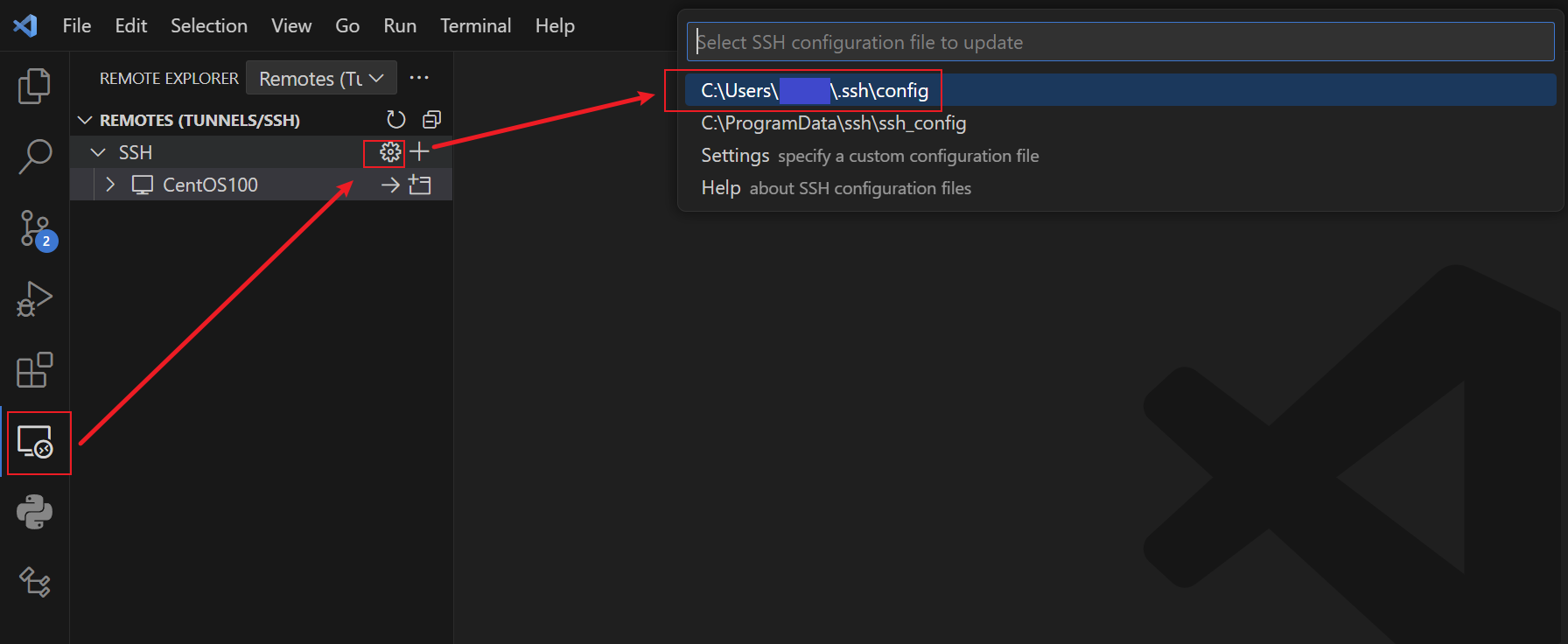
Click these three buttons sequentially to access the configuration file:
-
Fill in the configuration file (this file is essentially the SSH configuration for the host):
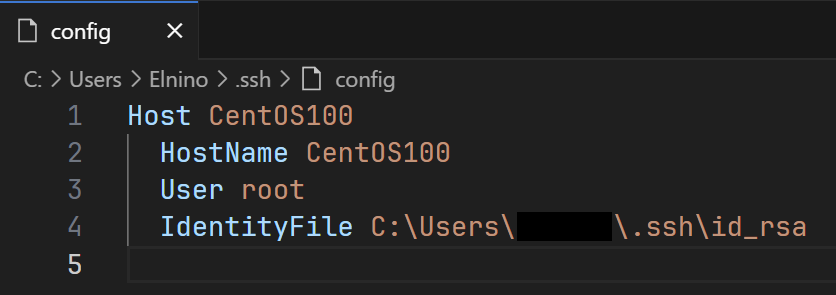
Host: an ID for this remote connection; you can choose any name.HostName: Domain name or IP address of the remote host.User: User to login to the remote host.IdentityFile: Path to the private key, whose public key is inauthorized_keys.
A few notes about the configuration file:
- If
authorized_keysis not configured on the remote host, theIdentityFileproperty will not take effect, and it will prompt for a password during login. - In this case,
IdentityFileis not necessary becauseauthorized_keysis the local machine's public key, and SSH defaults to using the local machine's private key for connection attempts. - Generally,
authorized_keyswon't be the local machine's public key, and in such cases,IdentityFilemust be configured; otherwise, a password will be required.