Using AI Programming to Enhance Development Efficiency 3
Introduction
Since March, GitHub Copilot has gone through multiple updates that have essentially made it unusable. Both domestic and foreign model providers introduced subscription plans (also called "coding plans") with aggressive rate limiting and reduced quotas. Watching all the complaints about domestic providers on Bilibili, along with the high prices and difficult payment methods of foreign providers, it seemed like the AI coding bubble was about to burst—the cost had become unaffordable for ordinary people. But at the end of April, DeepSeek V4 arrived and shattered that perception. DeepSeek V4's capabilities are near top-tier, yet its price is dozens to over a hundred times lower than the most advanced models. Its extremely strong infrastructure capabilities also deliver a great user experience. So I started using Claude Code connected to DeepSeek V4 for AI programming.
This post covers why I stopped using GitHub Copilot, some problems I encountered previously with AI coding and how I solved them, as well as my initial experience and impressions of using Claude Code with DeepSeek V4.
Dropping GitHub Copilot
Since March, GitHub Copilot has gone through several rounds of updates:
- Banned student plans from using all Sonnet and Opus models, and GPT 5.4 — GPT 5.3 Codex was still okay and met daily needs.
- Imposed large-scale rate limiting, adding daily and weekly quotas — I couldn't check how much quota remained, and conversations would be cut off mid-way by the limit; very disgusting.
- Fully disabled Sonnet and Opus 4.6 on Pro and higher-tier subscriptions, forcing users to only use Opus 4.7.
- Banned student plans from using GPT 5.3 Codex — although GPT 5.2 Codex wasn't unusable, I just couldn't be bothered anymore.
- Announced a full transition to a token plan, where the monthly subscription fee essentially buys an equivalent amount of tokens.
Later I read some Reddit comments. This latest update effectively turns GitHub Copilot into a relay station, without any discount. In that case, why wouldn't users just use OpenRouter? These updates will save a ton of costs, but they also strip away its advantages. Its only selling point now is deep integration with VS Code. Can that alone guarantee user stickiness? — Either way, I don't want to use it anymore.
I'm not trying to criticize GitHub, because it genuinely got abused way too much. In my previous post I mentioned a prompt that uses multiple subagents; that worked because a single user input counted as only one usage, no matter how many subagents were launched or how many tokens they consumed. I've also seen an even more outrageous trick online: let the main agent call the AskQuestion tool after finishing the current conversation to ask the user what they want to do next; after the user replies, the main agent continues with the next task, looping indefinitely. Since the user only submitted the prompt once, completing multiple tasks in this way still counted as a single usage.
Of course, GitHub Copilot's original inline suggestions are still great — that was its initial feature. Readers should distinguish between GitHub Copilot and GitHub Copilot Chat; the latter is the agentic programming part.
Problems During AI Coding
Inability to Execute Commands Correctly
Back when GitHub Copilot was still usable, I repeatedly ran into this issue: I wanted the AI to automatically run tests after completing a coding task, using this command:
1 | . .\venv\source\Activate |
But the AI would always mess up: either forget to activate the virtual environment, forget to set the environment variable, or even look in the wrong directory. I had explicitly written the testing conventions and this command in the predefined prompt, yet even without exceeding the context window, the AI's attention would drift and it couldn't correctly understand my instructions.
In other words, we want the AI to do something deterministically, not to gamble on the language model probabilistically doing it, because the latter depends too much on the model's comprehension ability. Earlier, I had just finished studying the course "Go Language Project Development in Practice", which mentioned that Makefiles are still the best way to manage projects. So I started using make.
The Makefile I wrote mostly uses phony targets, treating them as scripts that encapsulate multiple commands. But that's already good enough — I no longer need to remember long commands, I just call make test. It's the same for the AI: I restrict the AI to using only make commands and no other commands, which successfully solves the problem above.
Nowadays, many libraries from the pre-AI-coding era, when providing AI coding tools, prioritize building a CLI first and only then consider MCP — or skip MCP entirely. Besides saving context window, I think this trend is also related to the problem I encountered.
Poor Support for Windows Commands
AI coding has very poor support for Windows command lines because most discussions on the internet revolve around Linux commands. After the AI forgot countless times that PowerShell uses backticks for escaping, and since I never really liked cmdlets anyway, I decided to switch completely to Git Bash. After using it for a while, I found the compatibility to be quite good — most Linux commands are supported. My default shell is now Git Bash.
Missing Some Linux Tools
I noticed that GPT 5.3 Codex really liked using rg, but my Windows 10 didn't have this Linux command. A quick search revealed that ripgrep is a superior alternative to grep, so it seemed worth installing. But Git Bash obviously doesn't have a package manager like apt, so I started looking into package managers for Windows. The main options were Scoop, Chocolatey, and Winget. Since I only wanted to install some mainstream Linux tools and wanted to manually choose the installation paths, I decided on Scoop.
I installed commands like jq, rg, and make via Scoop. Just like Git Bash, these commands work well and have no compatibility issues.
Unable to Wait for Command Completion
One thing about GitHub Copilot made me really speechless was that it would often launch a command and immediately return, rather than blocking and waiting for the command to finish. After returning, it would say it couldn't get the command's output and then immediately re-execute the same command. This problem was especially noticeable when calling pytest.
At first I thought it was a problem with the built-in powershell on Windows, so I installed pwsh. After using it for a while, the same issue persisted. This was one of the reasons I switched to Git Bash, and also partly why I stopped wanting to use GitHub Copilot.
Using Claude Code Again
Solving Previous Problems
Looking back at the three reasons I mentioned in my previous post for why Claude Code wasn't great to use, they've all been addressed now:
Problem 1: Couldn't see which files Claude Code had modified. This problem is solved with Git: every round of changes the AI makes, we commit once, and finally squash all the commits together. If we don't want to create a separate branch, we can also use staging to differentiate existing changes from new ones. Claude Code itself guarantees it won't modify files outside the current project repository, and we can further enforce this restriction with hooks.
Problem 2: The Anthropic API consumed too many tokens. DeepSeek V4 offered a discount right after launch, and its input cache hit rate is extremely high with very long cache duration — truly "the more you buy, the more you save." Since it's so cheap, wasting tokens doesn't matter anymore.
Problem 3: Some Claude Code features didn't work properly on Windows 10. Using Git Bash solves 99% of the problems.
everything-claude-code
Two months ago, everything-claude-code was very popular on GitHub. Even though I was using GitHub Copilot at the time, I read through that repository's content and picked out some useful features.
Now that I'm using Claude Code again, I've read through it in detail once more. I recommend using the configuration from v1.0.0, and then modifying it based on later updates. That configuration reflects the author's original setup, rather than additions made by others later on. This also maps better to the three articles the author wrote.
I selected some of the agents, skills, commands, rules, and the CLAUDE.md, and adapted them for my needs.
Configuration
1 | { |
Hooks are quite important — they impose deterministic constraints and functionality amid the non-determinism of language models. The hooks I use are:
block-invalid-cli-tools.shbans certain commands, e.g., it should usepnpminstead ofnpm. The main reason for writing this hook is that Claude Code does not source~/.bash_profile(where I had already added the same restrictions), so I had no choice but to write a separate script again.block-invalid-read-write-edit-path.shensures that when Claude Code calls the Read, Write, and Edit tools, it only operates on files within the current project directory — no files outside that path. This is an extra safety measure. In practice, Claude Code does respect this and doesn't cross boundaries. The only downside is that in plan mode, Claude Code writes the plan as a file to~/.claude/plan, which this hook blocks, causing it to write to.claude/planin the current repository instead.log-tool-use.shlogs the tool name, success status, and relevant info of every tool use by Claude Code. For example, Read, Write, Edit additionally log the file path, and Bash logs the command. This log is mainly for easier troubleshooting when problems occur. Of course, logging is a common need, so the two scripts above also write logs. While writing this script, I noticed that the official Claude Code documentation is not comprehensive — for instance, loading a skill is a tool, but it's not documented.log-user-prompt.shrecords every prompt we submit for later reuse. There is a bug here: when the plan file gets blocked byblock-invalid-read-write-edit-path.sh, the content of the plan gets written into this log as if it were a user prompt.
Permissions are also quite important; proper configuration provides some security guarantees.
The status line script is a bit long, so I won't show it in full here. Here's an interesting snippet that displays a progress bar for context window usage. The example in the official Claude Code docs only shows increments of 10%, which is too coarse. By using specific characters, we can make the granularity as fine as $ 10\% / 8 = 1.25\%$.
1 | PCT=$(echo "$input" | jq -r '.context_window.used_percentage // 0' | cut -d. -f1) |
Some Lessons
The key to automation is letting the AI verify the code it writes; TDD is therefore very important. For the backend, we can achieve this through unit tests, integration tests, and smoke tests. For the frontend, we can use libraries like Jest for unit tests, and tools like agent-browser or Playwright to verify page functionality.
I don't like writing test code, but since AI is writing everything anyway, I might as well let it write the test code too.
The LSP plugin provided by Claude Code offers real-time code validation. The AI can immediately tell if there are errors right after making changes, allowing it to fix them faster and avoid massive rewrites. I'm currently using the gopls-lsp@claude-plugins-official plugin, which utilizes the gopls program — the same program that VS Code's official Go extension uses to provide language-level support.
Besides running tests after writing code, we can also have the AI run a lint tool and modify the code based on the static analysis results. This improves code quality and gives us more confidence in AI-written code. For example, we can use golangci-lint for Go, or ruff for Python. Dynamic languages like Python especially benefit from static code checking.
Voice Input
While watching Claude Code tutorials, I noticed a YouTuber who frequently used speech-to-text software to input large prompts by speaking, rather than typing. Even though speech-to-text has some inaccuracies, the LLM can understand and automatically correct those errors, just like it handles typos from a user.
The software he used is paid and internet-connected, which comes with some privacy risks. I had previously used CapsWriter-Offline, an open-source speech-to-text tool. It has recently updated with several more powerful models and become very easy to use. I now often input prompts and write articles by speaking.
Previously, typing prompts involved a lot of back-and-forth editing, which took a long time and drained energy. Speaking prompts is not only effortless but also improves my ability to express and think, making me consciously produce complete, continuous sentences.
Using DeepSeek V4
The pricing of deepseek-v4-pro feels almost like charity: 0.025 CNY per million input tokens on a cache hit, 3 CNY on a cache miss; 6 CNY per million output tokens. Clearly, the API prices of other domestic and foreign model providers can't compare with DeepSeek V4 at all. DeepSeek V4 is truly competing with subscription-based pricing.
Take a look at my usage:
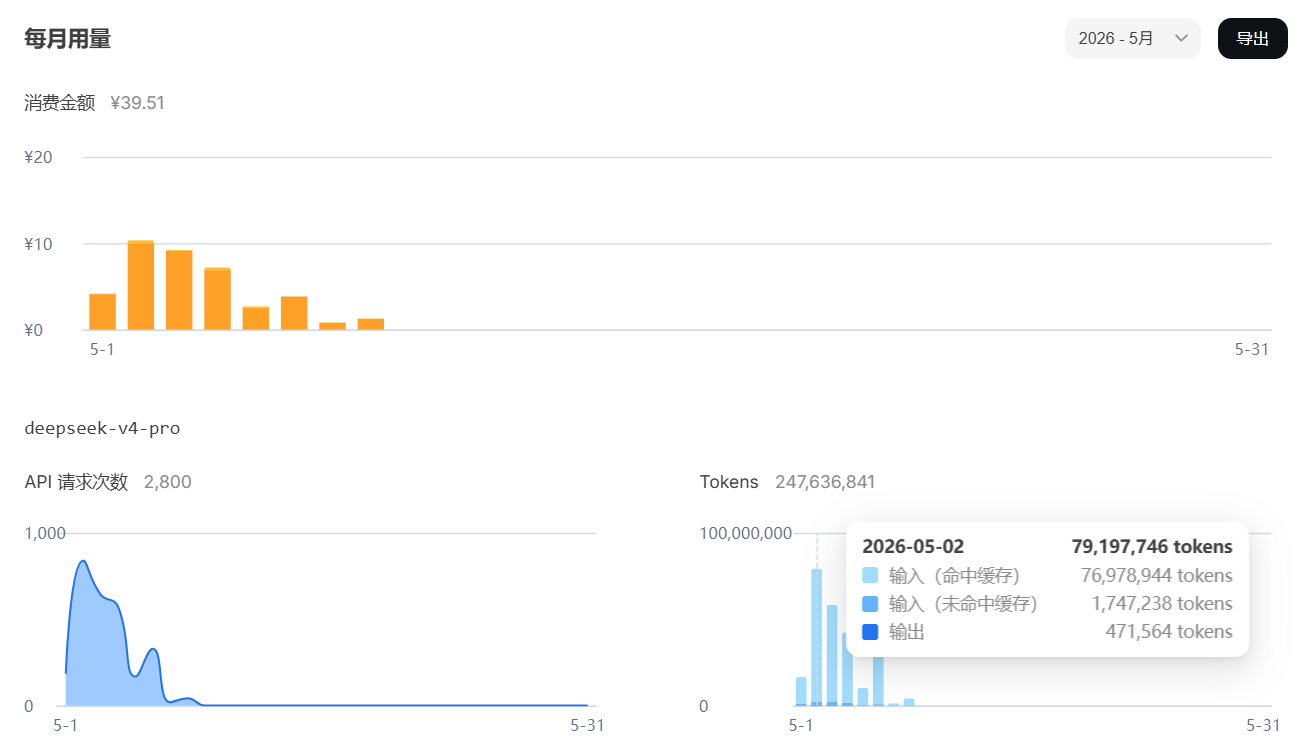
Although a high cache hit rate feels great (of course it's nice to save money), what really measures progress is the number of input tokens on cache misses and the number of output tokens.
The benefit of using an API is its extreme flexibility. With subscription plans that have rate limits (every-five-hour limits and weekly limits), if you want to avoid wasting money, you have to use it on a fixed schedule. I'm already annoyed enough by daily check-ins in mobile games — why should coding also require me to stick to fixed time slots? With an API, I can write more when I'm free, and write less or not at all when I'm busy. It's very freeing.
DeepSeek V4's strengths are not just about being cheap; I wouldn't use it if the capability wasn't there. That's also the main reason I've always used foreign models. I won't discuss its scores on various benchmarks here; instead, I'll talk about the 1M context window. Many Claude Code usage tips revolve around conserving the context window to avoid triggering automatic compression. This forces us to be extremely careful, even on edge, while using it. With a 1M context window, however, we can be much more relaxed and basically don't need to worry about this. Moreover, this 1M is a true 1M — unlike some models whose attention drifts as soon as the context gets slightly large (which is essentially the same as auto-compression), and unlike some models that charge extra when the context exceeds a certain size.
Of course, DeepSeek V4 also has its shortcomings. I saw a comment on Bilibili saying that DeepSeek V4's post-training is insufficient and it frequently forgets to use skills and other agent tools. My actual experience aligns with that: only when I explicitly emphasize using skills in CLAUDE.md, CLAUDE.local.md, and the prompt all at once does DeepSeek V4 load the skills I've installed, and often not all of them. Additionally, unless I specifically tell DeepSeek V4 to search the documentation, it doesn't proactively use WebSearch. Fortunately, as I'm writing this post, there are already rumors that DeepSeek V4.1 will be released next month. Hopefully the new version fixes the current issues.